


After the game, the king and the pawn go into the same box..
Sunday, September 8, 2013
Thursday, August 22, 2013
Keyboard Shortcuts
Keyboard Shortcuts 100+
(Microsoft Windows)

1. CTRL+C (Copy)
2. CTRL+X (Cut)
...... 3. CTRL+V (Paste)
4. CTRL+Z (Undo)
5. DELETE (Delete)
6. SHIFT+DELETE (Delete the selected item permanently without placing the item in the Recycle Bin)
7. CTRL while dragging an item (Copy the selected item)
8. CTRL+SHIFT while dragging an item (Create a shortcut to the selected item)
9. F2 key (Rename the selected item)
10. CTRL+RIGHT ARROW (Move the insertion point to the beginning of the next word)
11. CTRL+LEFT ARROW (Move the insertion point to the beginning of the previous word)
12. CTRL+DOWN ARROW (Move the insertion point to the beginning of the next paragraph)
13. CTRL+UP ARROW (Move the insertion point to the beginning of the previous paragraph)
14. CTRL+SHIFT with any of the arrow keys (Highlight a block of text)
SHIFT with any of the arrow keys (Select more than one item in a window or on the desktop, or select text in a document)
15. CTRL+A (Select all)
16. F3 key (Search for a file or a folder)
17. ALT+ENTER (View the properties for the selected item)
18. ALT+F4 (Close the active item, or quit the active program)
19. ALT+ENTER (Display the properties of the selected object)
20. ALT+SPACEBAR (Open the shortcut menu for the active window)
21. CTRL+F4 (Close the active document in programs that enable you to have multiple documents opensimultaneou sly)
22. ALT+TAB (Switch between the open items)
23. ALT+ESC (Cycle through items in the order that they had been opened)
24. F6 key (Cycle through the screen elements in a window or on the desktop)
25. F4 key (Display the Address bar list in My Computer or Windows Explorer)
26. SHIFT+F10 (Display the shortcut menu for the selected item)
27. ALT+SPACEBAR (Display the System menu for the active window)
28. CTRL+ESC (Display the Start menu)
29. ALT+Underlined letter in a menu name (Display the corresponding menu) Underlined letter in a command name on an open menu (Perform the corresponding command)
30. F10 key (Activate the menu bar in the active program)
31. RIGHT ARROW (Open the next menu to the right, or open a submenu)
32. LEFT ARROW (Open the next menu to the left, or close a submenu)
33. F5 key (Update the active window)
34. BACKSPACE (View the folder onelevel up in My Computer or Windows Explorer)
35. ESC (Cancel the current task)
36. SHIFT when you insert a CD-ROMinto the CD-ROM drive (Prevent the CD-ROM from automatically playing)
Dialog Box - Keyboard Shortcuts
1. CTRL+TAB (Move forward through the tabs)
2. CTRL+SHIFT+TAB (Move backward through the tabs)
3. TAB (Move forward through the options)
4. SHIFT+TAB (Move backward through the options)
5. ALT+Underlined letter (Perform the corresponding command or select the corresponding option)
6. ENTER (Perform the command for the active option or button)
7. SPACEBAR (Select or clear the check box if the active option is a check box)
8. Arrow keys (Select a button if the active option is a group of option buttons)
9. F1 key (Display Help)
10. F4 key (Display the items in the active list)
11. BACKSPACE (Open a folder one level up if a folder is selected in the Save As or Open dialog box)
Microsoft Natural Keyboard Shortcuts
1. Windows Logo (Display or hide the Start menu)
2. Windows Logo+BREAK (Display the System Properties dialog box)
3. Windows Logo+D (Display the desktop)
4. Windows Logo+M (Minimize all of the windows)
5. Windows Logo+SHIFT+M (Restorethe minimized windows)
6. Windows Logo+E (Open My Computer)
7. Windows Logo+F (Search for a file or a folder)
8. CTRL+Windows Logo+F (Search for computers)
9. Windows Logo+F1 (Display Windows Help)
10. Windows Logo+ L (Lock the keyboard)
11. Windows Logo+R (Open the Run dialog box)
12. Windows Logo+U (Open Utility Manager)
13. Accessibility Keyboard Shortcuts
14. Right SHIFT for eight seconds (Switch FilterKeys either on or off)
15. Left ALT+left SHIFT+PRINT SCREEN (Switch High Contrast either on or off)
16. Left ALT+left SHIFT+NUM LOCK (Switch the MouseKeys either on or off)
17. SHIFT five times (Switch the StickyKeys either on or off)
18. NUM LOCK for five seconds (Switch the ToggleKeys either on or off)
19. Windows Logo +U (Open Utility Manager)
20. Windows Explorer Keyboard Shortcuts
21. END (Display the bottom of the active window)
22. HOME (Display the top of the active window)
23. NUM LOCK+Asterisk sign (*) (Display all of the subfolders that are under the selected folder)
24. NUM LOCK+Plus sign (+) (Display the contents of the selected folder)
25. NUM LOCK+Minus sign (-) (Collapse the selected folder)
26. LEFT ARROW (Collapse the current selection if it is expanded, or select the parent folder)
27. RIGHT ARROW (Display the current selection if it is collapsed, or select the first subfolder)
Shortcut Keys for Character Map
After you double-click a character on the grid of characters, you can move through the grid by using the keyboard shortcuts:
1. RIGHT ARROW (Move to the rightor to the beginning of the next line)
2. LEFT ARROW (Move to the left orto the end of the previous line)
3. UP ARROW (Move up one row)
4. DOWN ARROW (Move down one row)
5. PAGE UP (Move up one screen at a time)
6. PAGE DOWN (Move down one screen at a time)
7. HOME (Move to the beginning of the line)
8. END (Move to the end of the line)
9. CTRL+HOME (Move to the first character)
10. CTRL+END (Move to the last character)
11. SPACEBAR (Switch between Enlarged and Normal mode when a character is selected)
Microsoft Management Console (MMC)
Main Window Keyboard Shortcuts
1. CTRL+O (Open a saved console)
2. CTRL+N (Open a new console)
3. CTRL+S (Save the open console)
4. CTRL+M (Add or remove a console item)
5. CTRL+W (Open a new window)
6. F5 key (Update the content of all console windows)
7. ALT+SPACEBAR (Display the MMC window menu)
8. ALT+F4 (Close the console)
9. ALT+A (Display the Action menu)
10. ALT+V (Display the View menu)
11. ALT+F (Display the File menu)
12. ALT+O (Display the Favorites menu)
MMC Console Window Keyboard Shortcuts
1. CTRL+P (Print the current page or active pane)
2. ALT+Minus sign (-) (Display the window menu for the active console window)
3. SHIFT+F10 (Display the Action shortcut menu for the selected item)
4. F1 key (Open the Help topic, if any, for the selected item)
5. F5 key (Update the content of all console windows)
6. CTRL+F10 (Maximize the active console window)
7. CTRL+F5 (Restore the active console window)
8. ALT+ENTER (Display the Properties dialog box, if any, for theselected item)
9. F2 key (Rename the selected item)
10. CTRL+F4 (Close the active console window. When a console has only one console window, this shortcut closes the console)
Remote Desktop Connection Navigation
1. CTRL+ALT+END (Open the Microsoft Windows NT Security dialog box)
2. ALT+PAGE UP (Switch between programs from left to right)
3. ALT+PAGE DOWN (Switch between programs from right to left)
4. ALT+INSERT (Cycle through the programs in most recently used order)
5. ALT+HOME (Display the Start menu)
6. CTRL+ALT+BREAK (Switch the client computer between a window and a full screen)
7. ALT+DELETE (Display the Windows menu)
8. CTRL+ALT+Minus sign (-) (Place a snapshot of the active window in the client on the Terminal server clipboard and provide the same functionality as pressing PRINT SCREEN on a local computer.)
9. CTRL+ALT+Plus sign (+) (Place asnapshot of the entire client window area on the Terminal server clipboardand provide the same functionality aspressing ALT+PRINT SCREEN on a local computer.)
Microsoft Internet Explorer Keyboard Shortcuts
1. CTRL+B (Open the Organize Favorites dialog box)
2. CTRL+E (Open the Search bar)
3. CTRL+F (Start the Find utility)
4. CTRL+H (Open the History bar)
5. CTRL+I (Open the Favorites bar)
6. CTRL+L (Open the Open dialog box)
7. CTRL+N (Start another instance of the browser with the same Web address)
8. CTRL+O (Open the Open dialog box,the same as CTRL+L)
9. CTRL+P (Open the Print dialog box)
10. CTRL+R (Update the current Web )
Thursday, January 24, 2013
Thursday, November 22, 2012
Thursday, August 30, 2012
Why Forex Trading is So Important?
Why Forex Trading is So Important?
Forex trading has been around for over 30 years but until the rise of the internet it was almost entirely in the hands of banks and other institutions with large investment funds. These days ordinary people can get involved although the financial institutions are still the major players. When I tell you that around US $4 trillion changes hands every day on the currency trading markets you will understand that only a small part of this belongs to ordinary people like you and me.
To get started you will need a high speed internet connection, a good system or the time to learn and develop your own system, and some money to invest.
You do not necessarily need a lot of money. Brokers now offer mini forex trading accounts and even micro Forex trading accounts which you can open with just a couple hundred dollars. However, it is better to have more, even if you do not put it all into the account in the beginning. Forex trading is risky and if you only have a couple hundred dollars, you probably should be doing something safer with it.
But assuming that you have the funds and you have decided that you want to make money with some kind of financial trading, let's take a look at why this could be a better option for you than stock or commodity trading.
1. No commissions and no fees.
If you have experience of the stock market you will know how your profits can be eaten away by brokers, exchange and even government fees. The global nature of the Forex market means that you do not have to pay any of these. Brokers make their money through the spread, which is the difference between the bid and ask prices of a currency. All you have to do is be sure that the price will go your way far enough to cover this.
2. No fixed lot size.
In commodity futures markets, the size of a lot or contract is set by the exchange and you cannot buy or sell less than one lot. But in spot forex trading you can theoretically set your own lot size. Most brokers have their own standard sizes but you can shop around and look for a broker who offers small or fractional lots.
3. A 24 hour market, five days a week.
For the whole of the global business week, the forex market never sleeps. This is great if you need to trade outside of normal business hours. You can work at your day job from 9 to 5 and trade currencies in the evenings. Or you can start whenever you get up in the morning, even if it is 5 a.m.
4. High leverage.
Forex brokers may offer up to 200 times your margin deposit in leverage, although 100 times is more common. This means that you have the chance to make a lot of money from only a small deposited fund. You would only need $100 or even $50 to control $10,000 dollars in a trade. As long as you have good risk management and remember that high leverage also means high risk, this can open up the possibility of a high return on your investment.
5. A massive market with high liquidity.
The forex market is so huge that even the banks, big as they are, each have limited influence. Insider trading is not an issue. And high liquidity means plenty of money in the markets so that you are never stuck unable to close a trade. You can even set software to close your position for you at a certain level of loss or profit.
6. Free tools and information from your broker.
Brokers are in strong competition with each other to attract retail traders so they are offering more and more features. We will look at how to choose your broker in a later section. They will offer you a demo account where you can practice your trading, sharpen your skills and try out or even develop your own system before you start to use real money. They will also provide the charts that you need to identify trends, and give you access to breaking forex news, all for free.
7. Low start up costs.
A good modern computer with a high speed internet connection is all that is needed to begin trading currencies. If you want to use a robot for your trading you can find one for $100 to $200. Plenty of information on trading currencies including advice on systems is available for free online.
8. You are in control.
As a Forex trader you will be in full control of your investment. You can access your account through your broker’s software platform and make the trades in real time yourself.
You also have control over the currencies that you buy and sell. You are not limited to dealing in your own country's currency. This means that if your national economy is in a very unpredictable state you can switch to trading two other currencies that are more stable.
So there are 8 good reasons to choose Forex over other forms of financial trading. Now let’s move on to the basic information that you need to be familiar with so that you can start trading.Happy piping......
Saturday, March 31, 2012
How to add a good Keyword by a Keyword Research
How to add a good Keyword by a Keyword Research

What is a Keyword
Keywords are the most powerful element in a SEO campaign. Simply they are the words that match against search strings in different search engine queries. On the whole they are not just help to SEO campaign also it help to improve the bulk of visitors.
Let’s break this word in to two pars
Key + Word
It means the key that use to step in your blog or site to the search engines is keyword.
I think now you can understand better than previous.
Choosing the right keyword is the first and most crucial step to a successful SEO campaign. If you fail to choose the right keyword the future of your blog or site will be very jaggy and like you waist your time and money both. So when you going to select a keyword first you must do a keyword research.
What is a Keyword Research?
A keyword research is an early, critical step in search engine optimization. It’s the difference between guessing what your visitors are searching for and knowing what they are searching for. In this position you need a little instinct to guess what your visitors looking for.
Tuesday, March 6, 2012
Related Post Widget for your blog Optimized Version
Related Post Widget for Your Blog (Optimized Version)

Related Post widget is a very useful widget that displays thumbnail preview of posts having same labels or categories at the bottom of each blog page. I told this is a very useful widget because this widget can increase your page views by encouraging visitors to discover more post and by keeping them engaged with your blog. By the way we have only few related post widgets create so far and most demotic one is Linkwithin widget. Also this widget will not let your old post to run to waste.
Normally if you install this gadget to your blog it will shows related post also in your home page after each post. I think this is an infelicitous view for visitors. So here I have percent you a solution for it. After you install this gadget you can see the different. So please kindly follow these steps.
1. Go to Linkwithin.
1. Go to Linkwithin.
2. Fill up the form appears in the page.
- Email address: your email address
- Blog Link: url of the blog
- Platform: Select relevant platform from the list
- Width: this will adjust the amount of thumbnail stories. If your post widthis less than 500px select 3 from the list. I prefer 4 is the most suitable
for a blog.
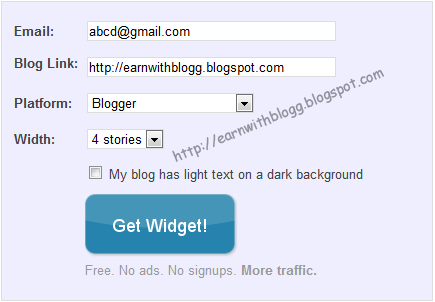
3. After filling the form data hit the Get Widget button and you will redirect to page like below.

4. Click Install Widget Link and logging to your blogger account.
this is the time to change the LinkWithin code to display thumbnails if you want to display only after the every post.

5. Change the Title (LinkWithin) to Related Post.
6. Then click Edit Template : link

<b:includable id='main'><b:if cond='data:blog.pageType == "item"'><data:content/></b:if></b:includable>
8. Then click Edit Content: link

<script>linkwithin_text='Related Posts:'</script>
10. Finally click on ADD WIDGET button and you will taken to blogger Page Elements page. Drag and drop the Related Post widget to the bottom of the Post body.
11. Click save button and see the different.
I know you will really love this change.
Tags: How to add Related Post widget, Linkwithin, Related post, Related pose widget
Monday, February 20, 2012
Search Engine Optimization Tips
Search Engine Optimization Tips (SEO Tips)

No one can tell exactly how your web site appears at the top of search engine results and what is the search engines needed to do it. But there are some techniques that can use to optimize your site to get a great result.
Here I’m going to tell you some of techniques that I have personally got great result with my SEO campaign. Search Engine Optimization is something that is frequently changing but if you learn at least the basic techniques you won’t go wrong.
Basically Search Engine Optimization means how your website gains a top order placement of Search engine results.
I will use my blog as an example while I going through this techniques.
Domains:
Most of bloggers say having your Keywords in URL of your site is important. My opinion is it is not a most important factor in SEO campaign but certainly it has some kind of value. Don’t worry it definitely would not hurt to go ahead. See my main Key words are online Money earning and blogging, I have earn and blog in my URL
Meta Tags:
This is a one of main fragment of on-page SEO campaign. Meta tags are placed between Head section of your site and it gives the main description/ idea about your blog or site to the search Engines. I have already given a big description about this category in a previous posts so I’m not going to present a big story here.
Key words :
I think this is the most important part. Selecting a good keyword is like half done. Always use a popular keyword. That will give you a great help. If you select a most searching keyword there is a big possibility to gain your site to the top of search result. See in my blog I use keyword like earn money, emoney, SEO.
Internal Linking:
Linking is method what is use to connect another page, another site or a place via a text or an image in the present page. This is also a traffic building method. If some one clicks on one link then it takes that user to another page. You can use this method to link your each web page or blog post between every post. This is a very valuable tip. If some one wants to build a page ranked blog he must use this tip. See in my every post I have included links to some words.
Wednesday, February 1, 2012
Zooming Effect Optimized Version
How to add a Zoom effect to your blog Images on mouse move

In previous post I show you a really amazing zooming effect that can use to impress your blog visitors, also I told you that I’ll show you another inconceivable zooming effect. This is also like the previous one. But i think this one is cuter than previous one.
Lets see how it looks like
Here is a preview

How to add this effect
Ok here is how to do it
Simply Search for “]]></b:skin>” on Edit Html and place the below mentioned code just above it
.bloggers2 img{
-webkit-transform:scale(0.8);
-moz-transform:scale(0.8);
-o-transform:scale(0.8);
-webkit-transition-duration: 0.5s;
-moz-transition-duration: 0.5s;
-o-transition-duration: 0.5s;
opacity: 1;
margin: 0 10px 5px 0;
}
.bloggers2 img:hover{
-webkit-transform:scale(0.9);
-moz-transform:scale(0.9);
-o-transform:scale(0.9);
opacity: 1;
}
Tags: How to add zoom, Zoom effect, zoom effect for blog, Image zooming, Picture zooming, Image zooming for blog
Saturday, January 28, 2012
How to add a Zoom effect to your blog Images
How to add a Zoom effect to your blog Images on mouse move
This is very graceful effect that can use to surprise your blog readers. I’m sure they all will really love it. Lets see how to insert it to your blog.

Here is a preview
OK here is the simple trick
Logging to your blogger account
Go to Edit HTML
Search for “]]></b:skin>” and place the under mentioned code just above it
.bloggers1 img{
-webkit-transform:scale(0.5); /*Webkit 0.7 times the original Image size*/
-moz-transform:scale(0.5); /*Mozilla 0.7 times the original Image size*/
-o-transform:scale(0.5); /*Opera 0.7 times the original Image size*/
-webkit-transition-duration: 0.5s; /*Webkit: Animation duration*/
-moz-transition-duration: 0.5s; /*Mozilla Animation duration*/
-o-transition-duration: 0.5s; /*Opera Animation duration*/
opacity: 0.8;
margin: 0 10px 5px 0;
}
.bloggers1 img:hover{
-webkit-transform:scale(1.1); /*Webkit: 0.5 times the original Image size*/
-moz-transform:scale(1.1); /*Mozilla 0.5 times the original Image size*/
-o-transform:scale(1.1); /*Opera 0.5 times the original Image size*/
box-shadow:0px 0px 30px gray;
-webkit-box-shadow:0px 0px 30px gray;
-moz-box-shadow:0px 0px 30px gray;
opacity: 1;
}
-webkit-transform:scale(0.5); /*Webkit 0.7 times the original Image size*/
-moz-transform:scale(0.5); /*Mozilla 0.7 times the original Image size*/
-o-transform:scale(0.5); /*Opera 0.7 times the original Image size*/
-webkit-transition-duration: 0.5s; /*Webkit: Animation duration*/
-moz-transition-duration: 0.5s; /*Mozilla Animation duration*/
-o-transition-duration: 0.5s; /*Opera Animation duration*/
opacity: 0.8;
margin: 0 10px 5px 0;
}
.bloggers1 img:hover{
-webkit-transform:scale(1.1); /*Webkit: 0.5 times the original Image size*/
-moz-transform:scale(1.1); /*Mozilla 0.5 times the original Image size*/
-o-transform:scale(1.1); /*Opera 0.5 times the original Image size*/
box-shadow:0px 0px 30px gray;
-webkit-box-shadow:0px 0px 30px gray;
-moz-box-shadow:0px 0px 30px gray;
opacity: 1;
}
Then…..
When you insert image to your blog go to edit html and ad this code before your image url “ <div class="bloggers1"> ”
After the image url ad </div>
Now you are done
Save and see what happen.this zooming effect is a basic effect that most bloggers use in there blogs. in next post i'll tell you a another version of this zooming effect.
Tags : how to add zooming effect, blog zooming, zooming images, mouse move zooming
Friday, January 6, 2012
what is backlink?
What is Backlink ?

Backlink is a Gold Mine
As a blog reader and a blogger number of times I heard the word Backlinks, I meet my few blogging friends and ask for Backlinks several time but unfortunately I didn’t get a good answer for that, finally I decided to search for it and as a result of it I found some information about it and I thought it should share with others.
Simply backlink is a any link received by a web page, directory, website, or top level domain from another web node
Backlink is a valuable part of a SEO campaign. Because how much we increase our Backlinks of our blog the value of the blog increase same as that. So most of webmasters saying putting Backlinks is like digging a gold mine.
Backlinking is not a hard thing. But also it is not a very easy thing
When you surfing on internet you can found some SEO companies and programs tell they give 1000 2000 backlink instantly. That’s right they are instant and worthless. So don’t be lazy to collect backlinks through that method. If you want to get good backlinks you have to collect them manually.
Putting your blog link in some ones site or blog normally called backlinking. It could be in article section or commenting section. Mostly I do it by commenting. When the search engine bots identified you link in another webpage it collected as a backlink.
The Value of a Backlink
Backlinks are very essential fact for a blog, As I told you above backlink is like a gold mine. Because each backlink increases your page rank every time. Bloggers know the value of page ranks. So if you want to get a page rank you have to create tons of natural backlinks manually. Don’t get artificial backlink. Think as google think about backlinks. Create one by one.
If you want to get a good page rank you have to get backlinks from page ranked sites.
How to Collect Natural Backlinks
I’m telling you the easiest and 100% accurate way, search on internet for do follow blogs. And you will find lists of do follow blogs. Commenting on that blogs, that’s what I’m doing. Always use page ranked blogs and sites to comment.
Also you can find article directories and submit articles and have your link mentioned in the resource box . this is also a very accurate backlinking method.
If you put alexa gadget in your site you can count your backlinks from it.
So that’s what I got from my searching about backlinks. Hope you will enjoy this and have a nice blogging….
Tags:
How to, How to add backlinks, Backlinks, What is backlinks, How to add backlinks, backlinks campains, Free Backlinks, free backlink generator
Tags:
How to, How to add backlinks, Backlinks, What is backlinks, How to add backlinks, backlinks campains, Free Backlinks, free backlink generator


